Remote library interface
The remote library interface provides means for having test libraries on different machines than where Robot Framework itself is running, and also for implementing libraries using other languages than the natively supported Python. For a test library, user remote libraries look pretty much the same as any other test library, and developing test libraries using the remote library interface is also very close to creating normal test libraries.
Introduction
There are two main reasons for using the remote library API:
-
It is possible to have actual libraries on different machines than where Robot Framework is running. This allows interesting possibilities for distributed testing.
-
Test libraries can be implemented using any language that supports XML-RPC protocol. There exists ready-made generic remote servers for various languages like Python, Java, Ruby, .NET, and so on.
The remote library interface is provided by the Remote library that is one of the standard libraries. This library does not have any keywords of its own, but it works as a proxy between the core framework and keywords implemented elsewhere. The Remote library interacts with actual library implementations through remote servers, and the Remote library and servers communicate using a simple remote protocol on top of an XML-RPC channel. The high level architecture of all this is illustrated in the picture below:
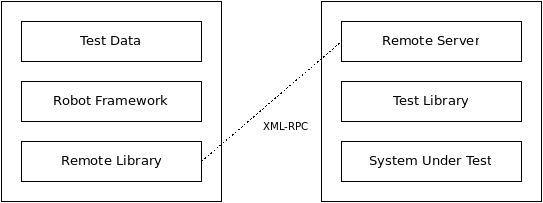
Robot Framework architecture with Remote library
Note
The remote client uses Python's standard XML-RPC module. It does not support custom XML-RPC extensions implemented by some XML-RPC servers.
Putting Remote library to use
Importing Remote library
The Remote library needs to know the address of the remote server but otherwise importing it and using keywords that it provides is no different to how other libraries are used. If you need to use the Remote library multiple times in a suite, or just want to give it a more descriptive name, you can give it an alias when importing it.
The URL used by the first example above is also the default address that the Remote library uses if no address is given.
The last example above shows how to give a custom timeout to the Remote library
as an optional second argument. The timeout is used when initially connecting
to the server and if a connection accidentally closes. Timeout can be
given in Robot Framework time format like 60s or 2 minutes 10 seconds.
The default timeout is typically several minutes, but it depends on the
operating system and its configuration. Notice that setting a timeout that
is shorter than keyword execution time will interrupt the keyword.
Note
Port 8270 is the default port that remote servers are expected
to use and it has been registered by IANA for this purpose.
This port number was selected because 82 and 70 are the ASCII codes
of letters R and F, respectively.
Note
When connecting to the local machine, it is recommended to use
IP address 127.0.0.1 instead of machine name localhost. This
avoids address resolution that can be extremely slow at least on
Windows.
Note
If the URI contains no path after the server address, the XML-RPC
module used by the Remote library will use /RPC2 path by
default. In practice using http://127.0.0.1:8270 is thus identical
to using http://127.0.0.1:8270/RPC2. Depending on the remote server
this may or may not be a problem. No extra path is appended if the
address has a path even if the path is just /. For example, neither
http://127.0.0.1:8270/ nor http://127.0.0.1:8270/my/path will be
modified.
Starting and stopping remote servers
Before the Remote library can be imported, the remote server providing the actual keywords must be started. If the server is started before launching the test execution, it is possible to use the normal Library setting like in the above example. Alternatively other keywords, for example from Process or SSH libraries, can start the server up, but then you may need to use Import Library keyword because the library is not available when the test execution starts.
How a remote server can be stopped depends on how it is implemented. Typically servers support the following methods:
- Regardless of the library used, remote servers should provide Stop Remote Server keyword that can be easily used by executed tests.
- Remote servers should have
stop_remote_servermethod in their XML-RPC interface. - Hitting
Ctrl-Con the console where the server is running should stop the server. - The server process can be terminated using tools provided by the
operating system (e.g.
kill).
Note
Servers may be configured so that users cannot stop it with
Stop Remote Server keyword or stop_remote_server
method.
Supported argument and return value types
Because the XML-RPC protocol does not support all possible object types, the values transferred between the Remote library and remote servers must be converted to compatible types. This applies to the keyword arguments the Remote library passes to remote servers and to the return values servers give back to the Remote library.
Both the Remote library and the Python remote server handle Python values according to the following rules. Other remote servers should behave similarly.
-
Strings, numbers and Boolean values are passed without modifications.
-
Python
Noneis converted to an empty string. -
All lists, tuples, and other iterable objects (except strings and dictionaries) are passed as lists so that their contents are converted recursively.
-
Dictionaries and other mappings are passed as dicts so that their keys are converted to strings and values converted to supported types recursively.
-
Returned dictionaries are converted to so called dot-accessible dicts that allow accessing keys as attributes using the extended variable syntax like
${result.key}. This works also with nested dictionaries like${root.child.leaf}. -
Strings containing bytes in the ASCII range that cannot be represented in XML (e.g. the null byte) are sent as Binary objects that internally use XML-RPC base64 data type. Received Binary objects are automatically converted to byte strings.
-
Other types are converted to strings.
Remote protocol
This section explains the protocol that is used between the Remote library and remote servers. This information is mainly targeted for people who want to create new remote servers.
The remote protocol is implemented on top of XML-RPC, which is a simple remote procedure call protocol using XML over HTTP. Most mainstream languages (Python, Java, C, Ruby, Perl, Javascript, PHP, ...) have a support for XML-RPC either built-in or as an extension.
The Python remote server can be used as a reference implementation.
Required methods
There are two possibilities how remote servers can provide information about the keywords they contain. They are briefly explained below and documented more thoroughly in the subsequent sections.
-
Remote servers can implement the same methods as the dynamic library API has. This means
get_keyword_namesmethod and optionalget_keyword_arguments,get_keyword_types,get_keyword_tagsandget_keyword_documentationmethods. Notice that using "camel-case names" likegetKeywordNamesis not possible similarly as in the normal dynamic API. -
Starting from Robot Framework 4.0, remote servers can have a single
get_library_informationmethod that returns all library and keyword information as a single dictionary. If a remote server has this method, the other getter methods likeget_keyword_namesare not used at all. This approach has the benefit that there is only one XML-RPC call to get information while the approach explained above requires several calls per keyword. With bigger libraries the difference can be significant.
Regardless how remote servers provide information about their keywords, they
must have run_keyword method that is used when keywords are executed.
How the actual keywords are implemented is not relevant for the Remote
library. Remote servers can either act as wrappers for the real test
libraries, like the available generic remote servers do, or they can
implement keywords themselves.
Remote servers should additionally have stop_remote_server
method in their public interface to ease stopping them. They should
also automatically expose this method as Stop Remote Server
keyword to allow using it in the test data regardless of the test
library. Allowing users to stop the server is not always desirable,
and servers may support disabling this functionality somehow.
The method, and also the exposed keyword, should return True
or False depending on whether stopping is allowed or not. That makes it
possible for external tools to know if stopping the server succeeded.
Using get_keyword_names and keyword specific getters
This section explains how the Remote library gets keyword names and other
information when the server implements get_keyword_names. The next sections
covers using the newer get_library_info method.
The get_keyword_names method must return names of the keyword the server
contains as a list of strings. Remote servers can, and should, also implement
get_keyword_arguments, get_keyword_types, get_keyword_tags and
get_keyword_documentation methods to provide more information about
the keywords. All these methods take the name of the keyword as an argument
and what they must return is explained in the table below.
| Method | Return value |
|---|---|
get_keyword_arguments |
Arguments as a list of strings in the same format as with dynamic libraries. |
get_keyword_types |
Type information as a list or dictionary of strings. See below for details. |
get_keyword_documentation |
Documentation as a string. |
get_keyword_tags |
Tags as a list of strings. |
Type information used for argument conversion can be returned either as
a list mapping type names to arguments based on position or as a dictionary
mapping argument names to type names directly. In practice this works the same
way as when specifying types using the @keyword decorator with normal
libraries. The difference is that because the XML-RPC protocol does not support
arbitrary values, type information needs to be specified using type names
or aliases like 'int' or 'integer', not using actual types like int.
Additionally None or null values may not be allowed by the XML-RPC server,
but an empty string can be used to indicate that certain argument does not
have type information instead.
Argument conversion is supported also based on default values using the
same logic as with normal libraries. For this to work, arguments with
default values must be returned as tuples, not as strings, the same way
as with dynamic libraries. For example, argument conversion works if
argument information is returned like [('count', 1), ('caseless', True)]
but not if it is ['count=1', 'caseless=True'].
Remote servers can also provide general library documentation to
be used when generating documentation with the Libdoc tool. This information
is got by calling get_keyword_documentation with special values __intro__
and __init__.
Note
get_keyword_types is new in Robot Framework 3.1 and support for
argument conversion based on defaults is new in Robot Framework 4.0.
Using get_library_information
The get_library_information method allows returning information about the whole
library in one XML-RPC call. The information must be returned as a dictionary where
keys are keyword names and values are nested dictionaries containing keyword information.
The dictionary can also contain separate entries for generic library information.
The keyword information dictionary can contain keyword arguments, documentation,
tags and types, and the respective keys are args, doc, tags and types.
Information must be provided using same semantics as when get_keyword_arguments,
get_keyword_documentation, get_keyword_tags and get_keyword_types discussed
in the previous section. If some information is not available, it can be omitted
from the info dictionary altogether.
get_library_information supports also returning general library documentation
to be used with Libdoc. It is done by including special __intro__ and __init__
entries into the returned library information dictionary.
For example, a Python library like
could be mapped into this kind of library information dictionary:
Note
get_library_information is new in Robot Framework 4.0.
Executing remote keywords
When the Remote library wants the server to execute some keyword, it
calls the remote server's run_keyword method and passes it the
keyword name, a list of arguments, and possibly a dictionary of
free named arguments. Base types can be used as
arguments directly, but more complex types are converted to supported
types.
The server must return results of the execution in a result dictionary
(or map, depending on terminology) containing items explained in the
following table. Notice that only the status entry is mandatory,
others can be omitted if they are not applicable.
| Name | Explanation |
|---|---|
| status | Mandatory execution status. Either PASS or FAIL. |
| output | Possible output to write into the log file. Must be given as a single string but can contain multiple messages and different log levels in format *INFO* First message\n*HTML* <b>2nd</b>\n*WARN* Another message. It is also possible to embed timestamps to the log messages like *INFO:1308435758660* Message with timestamp. |
| return | Possible return value. Must be one of the supported types. |
| error | Possible error message. Used only when the execution fails. |
| traceback | Possible stack trace to write into the log file using DEBUG level when the execution fails. |
| continuable | When set to True, or any value considered True in Python, the occurred failure is considered continuable. |
| fatal | Like continuable, but denotes that the occurred failure is fatal. |
Different argument syntaxes
The Remote library is a dynamic library, and in general it handles different argument syntaxes according to the same rules as any other dynamic library. This includes mandatory arguments, default values, varargs, as well as named argument syntax.
Also free named arguments (**kwargs) works mostly the same way
as with other dynamic libraries. First of all, the
get_keyword_arguments must return an argument specification that
contains **kwargs exactly like with any other dynamic library.
The main difference is that
remote servers' run_keyword method must have an optional third argument
that gets the kwargs specified by the user. The third argument must be optional
because, for backwards-compatibility reasons, the Remote library passes kwargs
to the run_keyword method only when they have been used in the test data.
In practice run_keyword should look something like the following
Python and Java examples, depending on how the language handles optional
arguments.